FilterPy Example - Financial Applications
This notebook demonstrates four Kalman filter variants applied to financial time series problems using the FilterPy library.
Topics covered:
- Linear Kalman Filter (KF): extracting a latent price trend from noisy data
- Extended Kalman Filter (EKF): pairs trading with a time-varying hedge ratio
- Unscented Kalman Filter (UKF): stochastic volatility estimation
- Ensemble Kalman Filter (EnKF): portfolio risk scenario analysis
References:
- https://
filterpy .readthedocs .io /en /latest/ - Roger Labbe, “Kalman and Bayesian Filters in Python”
- jupyter_script.md
%load_ext autoreload
%autoreload 2
%matplotlib inline
The autoreload extension is already loaded. To reload it, use:
%reload_ext autoreload
Imports
import os
import subprocess
import sys

# Find the git root and add necessary paths to sys.path.
_git_root = subprocess.check_output(
    ["git", "rev-parse", "--show-toplevel"], text=True
).strip()
_helpers_root = os.path.join(_git_root, "helpers_root")
for _path in [_git_root, _helpers_root]:
    if _path not in sys.path:
        sys.path.insert(0, _path)
import logging
import helpers.hdbg as hdbg
import helpers.hnotebook as hnoteboConfiguration
hdbg.init_logger(verbosity=logging.INFO)

_LOG = logging.getLogger(__name__)

hnotebo.config_notebook()WARNING: Logger already initialized: skipping
---------------------------------------------------------------------------
KeyError                                  Traceback (most recent call last)
Cell In[7], line 5
      1 hdbg.init_logger(verbosity=logging.INFO)
      3 _LOG = logging.getLogger(__name__)
----> 5 hnotebook.config_notebook()

File /git_root/helpers_root/helpers/hnotebook.py:8, in config_notebook(sns_set)
      4 def config_notebook(sns_set: bool = True) -> None:
      5     """
      6     Configure the notebook for plotting.
      7     """
----> 8     import helpers.hmodule as hmodule
     10     # Matplotlib.
     11     module = "matplotlib"

File /git_root/helpers_root/helpers/hmodule.py:14
     11 from typing import Any, Dict, Optional, Tuple
     13 import helpers.hdbg as hdbg
---> 14 import helpers.hserver as hserver
     16 _LOG = logging.getLogger(__name__)
     18 _WARNING = "\033[33mWARNING\033[0m"

File /git_root/helpers_root/helpers/hserver.py:590
    588     # Compute and cache the result.
    589     if not _is_called:
--> 590         _dassert_setup_consistency()
    591         _is_called = True
    592 else:

File /git_root/helpers_root/helpers/hserver.py:566, in _dassert_setup_consistency()
    559 def _dassert_setup_consistency() -> None:
    560     """
    561     Check that one and only one setup configuration is true.
    562
    563     This is used to ensure that the setup configuration is one of the
    564     expected ones and uniquely defined.
    565     """
--> 566     setups = _get_setup_settings()
    567     # One and only one set-up should be true.
    568     sum_ = sum([value for _, value in setups])

File /git_root/helpers_root/helpers/hserver.py:538, in _get_setup_settings()
    536 setups = []
    537 for func_name in func_names:
--> 538     val = eval(f"{func_name}()")
    539     setups.append((func_name, val))
    540 return setups

File <string>:1

File /git_root/helpers_root/helpers/hserver.py:470, in is_inside_docker_container_on_csfy_server()
    466 def is_inside_docker_container_on_csfy_server() -> bool:
    467     """
    468     Return whether we are running on a Docker container on a Causify server.
    469     """
--> 470     ret = is_inside_docker() and is_host_csfy_server()
    471     return ret

File /git_root/helpers_root/helpers/hserver.py:173, in is_host_csfy_server()
    169 def is_host_csfy_server() -> bool:
    170     """
    171     Return whether we are running on a Causify dev server.
    172     """
--> 173     host_name = _get_host_name()
    174     ret = host_name in get_dev_csfy_host_names()
    175     return ret

File /git_root/helpers_root/helpers/hserver.py:116, in _get_host_name()
    109 """
    110 Return the name of the host (not the machine) on which we are running.
    111
    112 If we are inside a Docker container, we use the name of the host passed
    113 through the `CSFY_HOST_NAME` env var.
    114 """
    115 if is_inside_docker():
--> 116     host_name = os.environ["CSFY_HOST_NAME"]
    117 else:
    118     # sysname='Linux'
    119     # nodename='dev1'
    120     # release='5.15.0-1081-aws'
    121     # version='#88~20.04.1-Ubuntu SMP Fri Mar 28 14:17:22 UTC 2025'
    122     # machine='x86_64'
    123     host_name = os.uname()[1]

File <frozen os>:685, in __getitem__(self, key)

KeyError: 'CSFY_HOST_NAME'
import tutorials.FilterPy.filterpy_example_utils as tffiexutCell 1: Introduction - Signal vs Noise in Financial Markets
- Purpose: Build intuition for why Bayesian filtering matters in finance by framing price data as a noisy observation of a hidden market state.
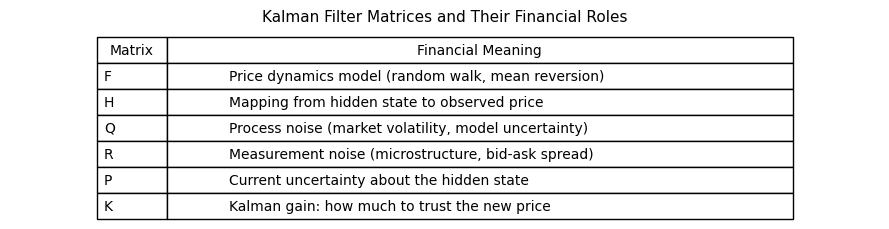
- Every Kalman variant shares the predict-update cycle; they differ only in how they handle nonlinearity in F or H.
- Finance provides natural examples of all four filter types.
# Show noisy price vs true underlying value and Kalman flow diagram.
tffiexut.plot_intro_signal_vs_noise()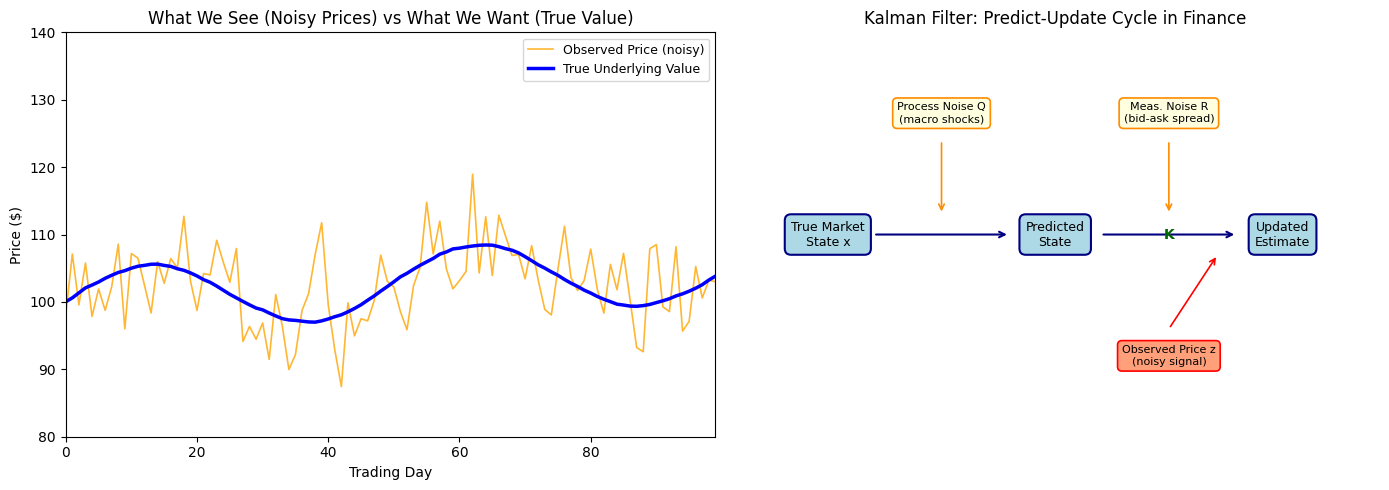
Cell 2: Linear Kalman Filter - Extracting Price Trend from Noise
- Purpose: Show how KalmanFilter tracks the latent price trend from noisy daily observations using a constant-velocity (trend + drift) state model.
- Larger R means we trust prices less and smooth more; larger Q lets the filter track rapid price changes.
- The ratio R/Q is the key tuning knob.
# Display interactive linear KF trend extraction with R and Q sliders.
tffiexut.show_linear_kf_trend_interactive()
Loading...
Cell 3: Linear Kalman Filter - Kalman Gain and Uncertainty Convergence
- Purpose: Show how the state covariance P and Kalman gain K evolve over time, giving intuition about when the filter trusts new prices vs the model.
- P converges to a steady state independent of P0; K decreases as the filter learns; this mirrors how an investor becomes more confident over time.
# Display interactive covariance P and Kalman gain K convergence.
tffiexut.show_kf_uncertainty_interactive()
Loading...
Cell 4: Extended Kalman Filter - Time-Varying Beta in Pairs Trading
- Purpose: Introduce the EKF for tracking a nonlinear, time-varying hedge ratio (beta) between two correlated stocks in a pairs trading strategy.
- EKF tracks beta in real time as the relationship evolves; cleaner spread means fewer false trading signals.
- State is log(beta); h(x) = exp(x)*stock_b is nonlinear.
# Display interactive EKF pairs trading beta estimation.
tffiexut.show_ekf_pairs_trading_interactive()
Cell 5: Extended Kalman Filter - Linearization in Log-Return Space
- Purpose: Visually show how EKF linearizes the nonlinear log transformation used in log-return models and where the approximation breaks down.
- EKF error grows with uncertainty and curvature; far from x0 (crash scenarios) EKF can diverge; this motivates UKF for more volatile regimes.
# Display interactive EKF linearization visualization.
tffiexut.show_ekf_linearization_interactive()
Cell 6: Unscented Kalman Filter - Stochastic Volatility Estimation
- Purpose: Show how UKF uses sigma points to estimate latent volatility from observed returns without computing Jacobians.
- UKF captures the asymmetry of log-volatility without Jacobians; 2n+1 = 3 sigma points span the scalar state distribution.
# Display interactive UKF stochastic volatility estimation.
tffiexut.show_ukf_volatility_interactive()
Cell 7: UKF vs EKF - Volatility Estimation Under Market Stress
- Purpose: Directly compare UKF and EKF on stochastic volatility estimation during a simulated market stress event (sudden volatility spike).
- EKF degrades faster than UKF under nonlinear stress regimes; UKF RMSE advantage grows with spike magnitude.
# Display interactive UKF vs EKF comparison under market stress.
tffiexut.show_ukf_vs_ekf_stress_interactive()
Cell 8: Ensemble Kalman Filter - Portfolio Risk Scenario Analysis
- Purpose: Show EnsembleKalmanFilter as a Monte Carlo tool where each particle represents a possible portfolio price state.
- The ensemble spread is a natural measure of tail risk; unlike Gaussian approximations the ensemble can capture skewed distributions.
# Display interactive EnKF portfolio risk scenario analysis.
tffiexut.show_enkf_portfolio_interactive()
Cell 9: All Four Filters - Financial State Estimation Comparison
- Purpose: Directly compare KF, EKF, UKF, and EnKF on the same financial state estimation problem and summarize when to use each filter.
- KF is optimal for linear models; EKF for mildly nonlinear; UKF for strongly nonlinear; EnKF for the full portfolio distribution.
# Run and display all four filters side by side with RMSE comparison.
tffiexut.plot_all_filters_financial_comparison()