Dask Array in 3 minutes
def print_obj(obj, tag=None):
    """
    Print an object in terms of type and then display is.
    """
    if tag:
        print(tag)
    print("type=", type(obj))
    display(obj)


def print_dask(obj, visualize_graph=True, compute=True):
    """
    Print information about a dask task graph.
    """
    print("type=", type(obj))
    print("obj=", obj)
    #
    print("# display")
    display(obj)
    #
    print("# dask")
    display(obj.dask)
    #
    if visualize_graph:
        print("# visualize")
        display(obj.visualize())
    #
    if compute:
        print("# compute")
        res = obj.compute()
        print(type(res))
        print(res)
# https://stackoverflow.com/questions/59070260/dask-client-detect-local-default-cluster-already-running
import os
os.environ["DASK_SCHEDULER_ADDRESS"] = "tcp://localhost:8787"
if not ("cluster" in globals() and "client" in globals()):
from dask.distributed import Client, LocalCluster
cluster = LocalCluster(dashboard_address=":8787")
client = Client(cluster)
print(client, client.dashboard_link)Small array
import numpy as np

x = np.ones(15)
x
array([1., 1., 1., 1., 1., 1., 1., 1., 1., 1., 1., 1., 1., 1., 1.])import dask.array as da
x = da.ones(15, chunks=(5,))
xLoading...
# The return type is a scalar.
x.sum()
Loading...
# Dask is lazy by default.
x.sum().compute()15.0Medium array
x = da.ones((10_000, 10_000), chunks=(5000, 5000))
print_dask(x)
type= <class 'dask.array.core.Array'>
obj= dask.array<ones_like, shape=(10000, 10000), dtype=float64, chunksize=(5000, 5000), chunktype=numpy.ndarray>
# display
Loading...
# dask
Loading...
# visualize
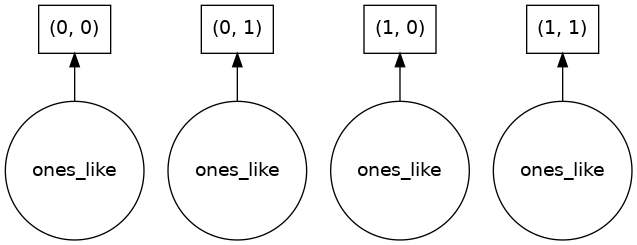
# compute
<class 'numpy.ndarray'>
[[1. 1. 1. ... 1. 1. 1.]
 [1. 1. 1. ... 1. 1. 1.]
 [1. 1. 1. ... 1. 1. 1.]
 ...
 [1. 1. 1. ... 1. 1. 1.]
 [1. 1. 1. ... 1. 1. 1.]
 [1. 1. 1. ... 1. 1. 1.]]
y = x + x.T

print_dask(y)
type= <class 'dask.array.core.Array'>
obj= dask.array<add, shape=(10000, 10000), dtype=float64, chunksize=(5000, 5000), chunktype=numpy.ndarray>
# display
Loading...
# dask
Loading...
# visualize
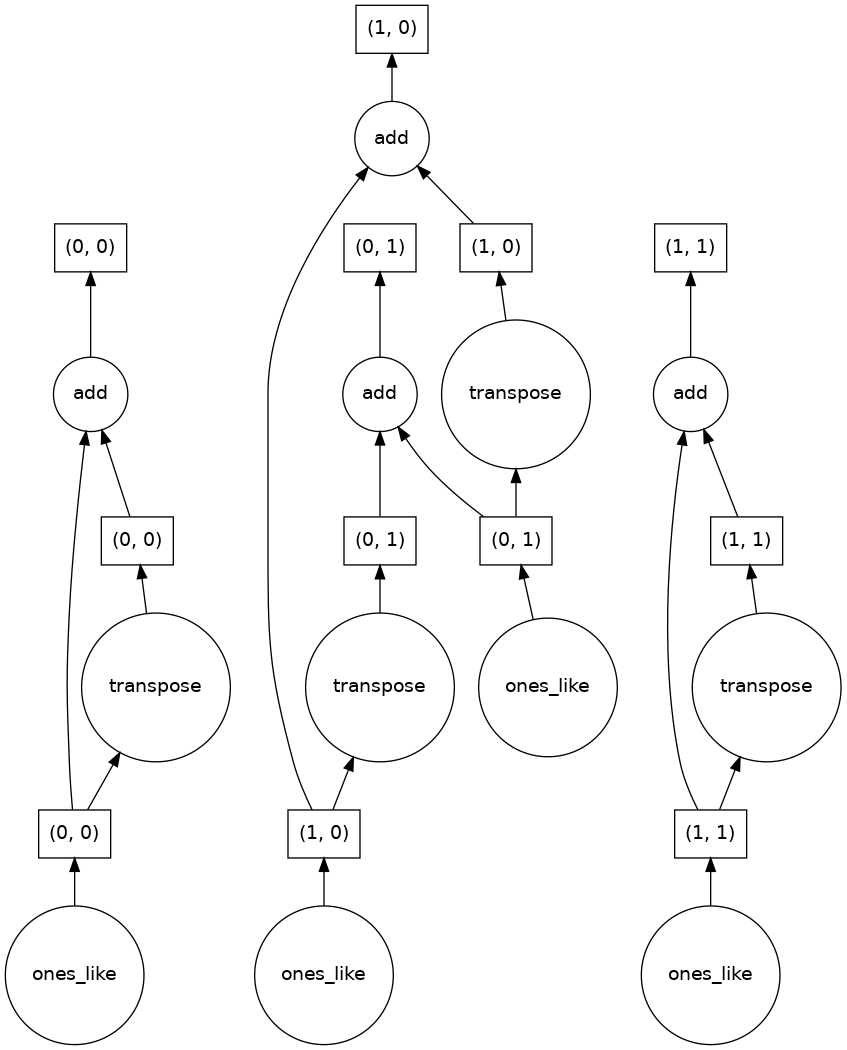
# compute
<class 'numpy.ndarray'>
[[2. 2. 2. ... 2. 2. 2.]
 [2. 2. 2. ... 2. 2. 2.]
 [2. 2. 2. ... 2. 2. 2.]
 ...
 [2. 2. 2. ... 2. 2. 2.]
 [2. 2. 2. ... 2. 2. 2.]
 [2. 2. 2. ... 2. 2. 2.]]
y.compute()array([[2., 2., 2., ..., 2., 2., 2.],
[2., 2., 2., ..., 2., 2., 2.],
[2., 2., 2., ..., 2., 2., 2.],
...,
[2., 2., 2., ..., 2., 2., 2.],
[2., 2., 2., ..., 2., 2., 2.],
[2., 2., 2., ..., 2., 2., 2.]])Larger array
x = da.ones((10_000, 10_000), chunks=(1000, 1000))
x
Loading...
y = x + x.T
print_dask(y)
type= <class 'dask.array.core.Array'>
obj= dask.array<add, shape=(10000, 10000), dtype=float64, chunksize=(1000, 1000), chunktype=numpy.ndarray>
# display
Loading...
# dask
Loading...
# visualize

# compute
<class 'numpy.ndarray'>
[[2. 2. 2. ... 2. 2. 2.]
 [2. 2. 2. ... 2. 2. 2.]
 [2. 2. 2. ... 2. 2. 2.]
 ...
 [2. 2. 2. ... 2. 2. 2.]
 [2. 2. 2. ... 2. 2. 2.]
 [2. 2. 2. ... 2. 2. 2.]]
y.compute()array([[2., 2., 2., ..., 2., 2., 2.],
[2., 2., 2., ..., 2., 2., 2.],
[2., 2., 2., ..., 2., 2., 2.],
...,
[2., 2., 2., ..., 2., 2., 2.],
[2., 2., 2., ..., 2., 2., 2.],
[2., 2., 2., ..., 2., 2., 2.]])Dask DataFrame: An introduction
import dask
import dask.dataframe as dd

# Get an example large dataset.
df_orig = dask.datasets.timeseries()
print_obj(df_orig)

# It has 30 partitions.
type= <class 'dask.dataframe.core.DataFrame'>
Loading...
# Save to disk in chunks.
df_orig.to_csv("data")
!ls -lh data
total 176M
-rw-r--r-- 1 root root 5.8M Apr 6 20:42 00.part
-rw-r--r-- 1 root root 5.8M Apr 6 20:42 01.part
-rw-r--r-- 1 root root 5.8M Apr 6 20:42 02.part
-rw-r--r-- 1 root root 5.9M Apr 6 20:42 03.part
-rw-r--r-- 1 root root 5.9M Apr 6 20:42 04.part
-rw-r--r-- 1 root root 5.9M Apr 6 20:42 05.part
-rw-r--r-- 1 root root 5.8M Apr 6 20:42 06.part
-rw-r--r-- 1 root root 5.8M Apr 6 20:42 07.part
-rw-r--r-- 1 root root 5.9M Apr 6 20:42 08.part
-rw-r--r-- 1 root root 5.8M Apr 6 20:42 09.part
-rw-r--r-- 1 root root 5.9M Apr 6 20:42 10.part
-rw-r--r-- 1 root root 5.9M Apr 6 20:42 11.part
-rw-r--r-- 1 root root 5.8M Apr 6 20:42 12.part
-rw-r--r-- 1 root root 5.9M Apr 6 20:42 13.part
-rw-r--r-- 1 root root 5.8M Apr 6 20:42 14.part
-rw-r--r-- 1 root root 5.9M Apr 6 20:42 15.part
-rw-r--r-- 1 root root 5.8M Apr 6 20:42 16.part
-rw-r--r-- 1 root root 5.8M Apr 6 20:42 17.part
-rw-r--r-- 1 root root 5.9M Apr 6 20:42 18.part
-rw-r--r-- 1 root root 5.8M Apr 6 20:42 19.part
-rw-r--r-- 1 root root 5.9M Apr 6 20:42 20.part
-rw-r--r-- 1 root root 5.9M Apr 6 20:42 21.part
-rw-r--r-- 1 root root 5.8M Apr 6 20:42 22.part
-rw-r--r-- 1 root root 5.8M Apr 6 20:42 23.part
-rw-r--r-- 1 root root 5.8M Apr 6 20:42 24.part
-rw-r--r-- 1 root root 5.8M Apr 6 20:42 25.part
-rw-r--r-- 1 root root 5.8M Apr 6 20:42 26.part
-rw-r--r-- 1 root root 5.8M Apr 6 20:42 27.part
-rw-r--r-- 1 root root 5.8M Apr 6 20:42 28.part
-rw-r--r-- 1 root root 5.8M Apr 6 20:42 29.part
drwxr-xr-x 2 root root 4.0K Apr 4 15:14 analysis
-rw-r--r-- 1 root root 1.7M Apr 4 14:43 data
drwxr-xr-x 2 root root 4.0K Apr 4 14:22 myfile.parquet
# Load one chunk.
import pandas as pd

df = pd.read_csv("data/00.part", parse_dates=["timestamp"])
df
Loading...
df.x.mean()0.0006411407257602942df.groupby("name").x.std()name
Alice 0.575509
Bob 0.573823
Charlie 0.578024
Dan 0.571394
Edith 0.576030
Frank 0.572761
George 0.566578
Hannah 0.581152
Ingrid 0.573406
Jerry 0.581904
Kevin 0.574399
Laura 0.582828
Michael 0.579548
Norbert 0.572477
Oliver 0.577507
Patricia 0.574525
Quinn 0.578594
Ray 0.581503
Sarah 0.578297
Tim 0.586799
Ursula 0.575453
Victor 0.581946
Wendy 0.577952
Xavier 0.573557
Yvonne 0.585677
Zelda 0.578599
Name: x, dtype: float64
# Read one partition with Dask.
# df = dd.read_csv("data/00.part", parse_dates=["timestamp"])

# Read all partitions with Dask.
df = dd.read_csv("data/*.part", parse_dates=["timestamp"])

print_obj(df)

# head() materializes the data.
df.head()
type= <class 'dask.dataframe.core.DataFrame'>
Loading...
Loading...
# We get a "lazy result". Dask reads from disk only when one asks for a result.
obj = df.x.mean()

print_obj(obj)
type= <class 'dask.dataframe.core.Scalar'>
dd.Scalar<series-..., dtype=float64>print_dask(obj, compute=False)type= <class 'dask.dataframe.core.Scalar'>
obj= dd.Scalar<series-..., dtype=float64>
# display
dd.Scalar<series-..., dtype=float64># dask
Loading...
# visualize

df.x.mean().compute()0.00010914505884446845obj = df.groupby("name").x.std()
obj.compute()name
Alice 0.576795
Bob 0.576486
Charlie 0.577941
Dan 0.576145
Edith 0.576822
Frank 0.577281
George 0.576158
Hannah 0.578663
Ingrid 0.576998
Jerry 0.576230
Kevin 0.577132
Laura 0.577517
Michael 0.576537
Norbert 0.577854
Oliver 0.576422
Patricia 0.577839
Quinn 0.576708
Ray 0.577373
Sarah 0.578253
Tim 0.577886
Ursula 0.576609
Victor 0.578285
Wendy 0.577939
Xavier 0.577483
Yvonne 0.579180
Zelda 0.578322
Name: x, dtype: float64Index, partitions, and sorting
# The original data read is made of 30 partitions.
# Each partition can be read in parallel and independently.
df
Loading...
df.partitions[5]Loading...
obj = df.partitions[5].compute()

print_obj(obj)
type= <class 'pandas.core.frame.DataFrame'>
Loading...
# Apply a function across all the partitions.
# df.map_partitions(type).compute()
df.map_partitions(len).compute()
0 86400
1 86400
2 86400
3 86400
4 86400
5 86400
6 86400
7 86400
8 86400
9 86400
10 86400
11 86400
12 86400
13 86400
14 86400
15 86400
16 86400
17 86400
18 86400
19 86400
20 86400
21 86400
22 86400
23 86400
24 86400
25 86400
26 86400
27 86400
28 86400
29 86400
dtype: int64# Read the first partition.
df.head()Loading...
# Read the last partition.
df.tail()
Loading...
# This forces Dask to read the data but it doesn't compute.
df = df.set_index("timestamp")
print_obj(df)

# The partitions host data between two different timestamps.
# In this way Dask knows in which file chunks of data.
type= <class 'dask.dataframe.core.DataFrame'>
Loading...
# Save files to Parquet.
df.to_parquet("myfile.parquet")
!ls myfile.parquetpart.0.parquet part.16.parquet part.23.parquet part.4.parquet
part.1.parquet part.17.parquet part.24.parquet part.5.parquet
part.10.parquet part.18.parquet part.25.parquet part.6.parquet
part.11.parquet part.19.parquet part.26.parquet part.7.parquet
part.12.parquet part.2.parquet part.27.parquet part.8.parquet
part.13.parquet part.20.parquet part.28.parquet part.9.parquet
part.14.parquet part.21.parquet part.29.parquet
part.15.parquet part.22.parquet part.3.parquet
Dask Bag
import dask.bag as db

# Create a bag storing 10 elements.
b = db.from_sequence([1, 2, 3, 4, 5, 6, 7, 8, 9, 10], npartitions=4)
print_obj(b)
type= <class 'dask.bag.core.Bag'>
dask.bag<from_sequence, npartitions=4># This produces a new bag.
obj = b.map(lambda x: x**2)
print_obj(b)type= <class 'dask.bag.core.Bag'>
dask.bag<from_sequence, npartitions=4># Execute.
obj.compute()[1, 4, 9, 16, 25, 36, 49, 64, 81, 100]# One can chain computations: e.g., filter, square and sum.
obj = b.filter(lambda x: x % 2 == 0).map(lambda x: x**2).sum()
print_obj(obj)type= <class 'dask.bag.core.Item'>
<dask.bag.core.Item at 0x7f52d6d95ed0>print_dask(obj)type= <class 'dask.bag.core.Item'>
obj= <dask.bag.core.Item object at 0x7f52d6d95ed0>
# display
<dask.bag.core.Item at 0x7f52d6d95ed0># dask
Loading...
# visualize
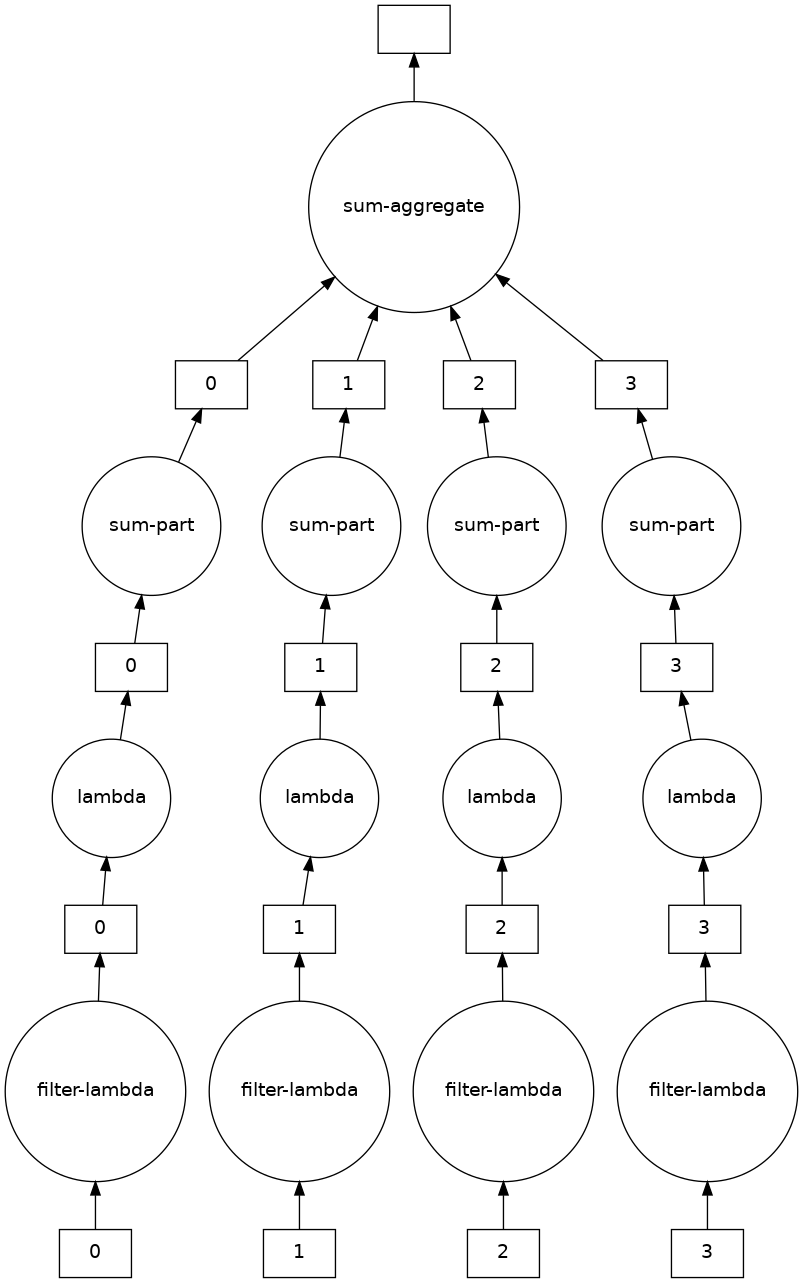
# compute
<class 'int'>
220
obj.compute()220An example with JSON data
#!wget https://archive.analytics.mybinder.org/events-2019-06-17.jsonl!pip install aiohttp requestsRequirement already satisfied: aiohttp in /usr/local/lib/python3.10/dist-packages (3.8.4)
Requirement already satisfied: requests in /usr/local/lib/python3.10/dist-packages (2.28.2)
Requirement already satisfied: charset-normalizer<4.0,>=2.0 in /usr/local/lib/python3.10/dist-packages (from aiohttp) (3.1.0)
Requirement already satisfied: yarl<2.0,>=1.0 in /usr/local/lib/python3.10/dist-packages (from aiohttp) (1.8.2)
Requirement already satisfied: attrs>=17.3.0 in /usr/local/lib/python3.10/dist-packages (from aiohttp) (22.2.0)
Requirement already satisfied: multidict<7.0,>=4.5 in /usr/local/lib/python3.10/dist-packages (from aiohttp) (6.0.4)
Requirement already satisfied: async-timeout<5.0,>=4.0.0a3 in /usr/local/lib/python3.10/dist-packages (from aiohttp) (4.0.2)
Requirement already satisfied: frozenlist>=1.1.1 in /usr/local/lib/python3.10/dist-packages (from aiohttp) (1.3.3)
Requirement already satisfied: aiosignal>=1.1.2 in /usr/local/lib/python3.10/dist-packages (from aiohttp) (1.3.1)
Requirement already satisfied: urllib3<1.27,>=1.21.1 in /usr/local/lib/python3.10/dist-packages (from requests) (1.26.15)
Requirement already satisfied: idna<4,>=2.5 in /usr/local/lib/python3.10/dist-packages (from requests) (3.4)
Requirement already satisfied: certifi>=2017.4.17 in /usr/local/lib/python3.10/dist-packages (from requests) (2022.12.7)
WARNING: Running pip as the 'root' user can result in broken permissions and conflicting behaviour with the system package manager. It is recommended to use a virtual environment instead: https://pip.pypa.io/warnings/venv
import os
import requests

# os.system("rm -rf data_json")
os.system("mkdir data_json")

for month in range(6, 7):
    for day in range(1, 30):
        file = "events-2019-%02d-%02d.jsonl" % (month, day)
        dst_file = f"data_json/{file}"
        print(dst_file)
        if os.path.exists(dst_file):
            continue
        url = "https://archive.analytics.mybinder.org/%s" % file
        print(url)
        r = requests.get(url, allow_redirects=True)
        open(dst_file, "wb").write(r.content)
data_json/events-2019-06-01.jsonl
data_json/events-2019-06-02.jsonl
data_json/events-2019-06-03.jsonl
data_json/events-2019-06-04.jsonl
data_json/events-2019-06-05.jsonl
data_json/events-2019-06-06.jsonl
data_json/events-2019-06-07.jsonl
data_json/events-2019-06-08.jsonl
data_json/events-2019-06-09.jsonl
data_json/events-2019-06-10.jsonl
data_json/events-2019-06-11.jsonl
data_json/events-2019-06-12.jsonl
data_json/events-2019-06-13.jsonl
data_json/events-2019-06-14.jsonl
data_json/events-2019-06-15.jsonl
data_json/events-2019-06-16.jsonl
data_json/events-2019-06-17.jsonl
data_json/events-2019-06-18.jsonl
data_json/events-2019-06-19.jsonl
data_json/events-2019-06-20.jsonl
data_json/events-2019-06-21.jsonl
data_json/events-2019-06-22.jsonl
data_json/events-2019-06-23.jsonl
data_json/events-2019-06-24.jsonl
data_json/events-2019-06-25.jsonl
data_json/events-2019-06-26.jsonl
data_json/events-2019-06-27.jsonl
data_json/events-2019-06-28.jsonl
data_json/events-2019-06-29.jsonl
mkdir: cannot create directory ‘data_json’: File exists
!ls data_json/*
!du -h data_json
data_json/events-2019-06-01.jsonl data_json/events-2019-06-16.jsonl
data_json/events-2019-06-02.jsonl data_json/events-2019-06-17.jsonl
data_json/events-2019-06-03.jsonl data_json/events-2019-06-18.jsonl
data_json/events-2019-06-04.jsonl data_json/events-2019-06-19.jsonl
data_json/events-2019-06-05.jsonl data_json/events-2019-06-20.jsonl
data_json/events-2019-06-06.jsonl data_json/events-2019-06-21.jsonl
data_json/events-2019-06-07.jsonl data_json/events-2019-06-22.jsonl
data_json/events-2019-06-08.jsonl data_json/events-2019-06-23.jsonl
data_json/events-2019-06-09.jsonl data_json/events-2019-06-24.jsonl
data_json/events-2019-06-10.jsonl data_json/events-2019-06-25.jsonl
data_json/events-2019-06-11.jsonl data_json/events-2019-06-26.jsonl
data_json/events-2019-06-12.jsonl data_json/events-2019-06-27.jsonl
data_json/events-2019-06-13.jsonl data_json/events-2019-06-28.jsonl
data_json/events-2019-06-14.jsonl data_json/events-2019-06-29.jsonl
data_json/events-2019-06-15.jsonl
67M data_json
!head data_json/events-2019-06-14.jsonl

!du -h data_json/events-2019-06-14.jsonl
{"timestamp": "2019-06-14T00:00:00+00:00", "schema": "binderhub.jupyter.org/launch", "version": 3, "provider": "GitHub", "spec": "QuantStack/xeus-cling/stable", "status": "success", "origin": "gke.mybinder.org"}
{"timestamp": "2019-06-14T00:00:00+00:00", "schema": "binderhub.jupyter.org/launch", "version": 3, "provider": "GitHub", "spec": "TheZetner/jupyter-examples-2019/master", "status": "success", "origin": "gke.mybinder.org"}
{"timestamp": "2019-06-14T00:00:00+00:00", "schema": "binderhub.jupyter.org/launch", "version": 3, "provider": "GitHub", "spec": "binder-examples/r/master", "status": "success", "origin": "gke.mybinder.org"}
{"timestamp": "2019-06-14T00:00:00+00:00", "schema": "binderhub.jupyter.org/launch", "version": 3, "provider": "GitHub", "spec": "binder-examples/r/master", "status": "success", "origin": "gke.mybinder.org"}
{"timestamp": "2019-06-14T00:00:00+00:00", "schema": "binderhub.jupyter.org/launch", "version": 3, "provider": "GitHub", "spec": "DS-100/textbook/master", "status": "success", "origin": "gke.mybinder.org"}
{"timestamp": "2019-06-14T00:01:00+00:00", "schema": "binderhub.jupyter.org/launch", "version": 3, "provider": "GitHub", "spec": "ipython/ipython-in-depth/master", "status": "success", "origin": "gke.mybinder.org"}
{"timestamp": "2019-06-14T00:01:00+00:00", "schema": "binderhub.jupyter.org/launch", "version": 3, "provider": "GitHub", "spec": "ipython/ipython-in-depth/master", "status": "success", "origin": "gke.mybinder.org"}
{"timestamp": "2019-06-14T00:01:00+00:00", "schema": "binderhub.jupyter.org/launch", "version": 3, "provider": "GitHub", "spec": "ipython/ipython-in-depth/master", "status": "success", "origin": "gke.mybinder.org"}
{"timestamp": "2019-06-14T00:01:00+00:00", "schema": "binderhub.jupyter.org/launch", "version": 3, "provider": "GitHub", "spec": "jupyterlab/jupyterlab-demo/master", "status": "success", "origin": "gke.mybinder.org"}
{"timestamp": "2019-06-14T00:02:00+00:00", "schema": "binderhub.jupyter.org/launch", "version": 3, "provider": "GitHub", "spec": "ComputoCienciasUniandes/FISI2028-201910/master", "status": "success", "origin": "gke.mybinder.org"}
2.4M data_json/events-2019-06-14.jsonl
import dask.bag as db

# Read a single file.
# lines = db.read_text("data_json/events-2019-06-14.jsonl")

# Read all files.
lines = db.read_text("data_json/events-*.jsonl")

# Read the first 2 lines.
lines.take(2)
('{"timestamp": "2019-06-01T00:00:00+00:00", "schema": "binderhub.jupyter.org/launch", "version": 2, "provider": "GitHub", "spec": "sbl-sdsc/mmtf-workshop-2018/master", "status": "success"}\n',
'{"timestamp": "2019-06-01T00:01:00+00:00", "schema": "binderhub.jupyter.org/launch", "version": 2, "provider": "GitHub", "spec": "DS-100/textbook/master", "status": "success"}\n')# It has a certain number of partitions, one per original file.
linesdask.bag<bag-from-delayed, npartitions=29># Transform the JSON lines into structured data.
import json
records = lines.map(json.loads)
records.take(2)({'timestamp': '2019-06-01T00:00:00+00:00',
'schema': 'binderhub.jupyter.org/launch',
'version': 2,
'provider': 'GitHub',
'spec': 'sbl-sdsc/mmtf-workshop-2018/master',
'status': 'success'},
{'timestamp': '2019-06-01T00:01:00+00:00',
'schema': 'binderhub.jupyter.org/launch',
'version': 2,
'provider': 'GitHub',
'spec': 'DS-100/textbook/master',
'status': 'success'})# Do a frequency count to find binders that run the most often.
records.map(lambda d: d["spec"]).frequencies(sort=True).compute()# Look for records that have "dask" in the specs.
obj = records.filter(lambda d: "dask" in d["spec"])
# Convert to strings and saves.
obj = obj.map(json.dumps).to_textfiles("data/analysis/*.json")!ls -l data/analysistotal 440
-rw-r--r-- 1 root root 8233 Apr 6 20:43 00.json
-rw-r--r-- 1 root root 6815 Apr 6 20:43 01.json
-rw-r--r-- 1 root root 6801 Apr 6 20:43 02.json
-rw-r--r-- 1 root root 10753 Apr 6 20:43 03.json
-rw-r--r-- 1 root root 12211 Apr 6 20:43 04.json
-rw-r--r-- 1 root root 14101 Apr 6 20:43 05.json
-rw-r--r-- 1 root root 12530 Apr 6 20:43 06.json
-rw-r--r-- 1 root root 5071 Apr 6 20:43 07.json
-rw-r--r-- 1 root root 6622 Apr 6 20:43 08.json
-rw-r--r-- 1 root root 12887 Apr 6 20:43 09.json
-rw-r--r-- 1 root root 20549 Apr 6 20:43 10.json
-rw-r--r-- 1 root root 21964 Apr 6 20:43 11.json
-rw-r--r-- 1 root root 15047 Apr 6 20:43 12.json
-rw-r--r-- 1 root root 23266 Apr 6 20:43 13.json
-rw-r--r-- 1 root root 9631 Apr 6 20:43 14.json
-rw-r--r-- 1 root root 10921 Apr 6 20:43 15.json
-rw-r--r-- 1 root root 18209 Apr 6 20:43 16.json
-rw-r--r-- 1 root root 21744 Apr 6 20:43 17.json
-rw-r--r-- 1 root root 18538 Apr 6 20:43 18.json
-rw-r--r-- 1 root root 22178 Apr 6 20:43 19.json
-rw-r--r-- 1 root root 15479 Apr 6 20:43 20.json
-rw-r--r-- 1 root root 6513 Apr 6 20:43 21.json
-rw-r--r-- 1 root root 6696 Apr 6 20:43 22.json
-rw-r--r-- 1 root root 9616 Apr 6 20:43 23.json
-rw-r--r-- 1 root root 13590 Apr 6 20:43 24.json
-rw-r--r-- 1 root root 17151 Apr 6 20:43 25.json
-rw-r--r-- 1 root root 14269 Apr 6 20:43 26.json
-rw-r--r-- 1 root root 18415 Apr 6 20:43 27.json
-rw-r--r-- 1 root root 5224 Apr 6 20:43 28.json
!head -20 data/analysis/00.json{"timestamp": "2019-06-01T00:11:00+00:00", "schema": "binderhub.jupyter.org/launch", "version": 2, "provider": "GitHub", "spec": "dask/dask-examples/master", "status": "success"}
{"timestamp": "2019-06-01T01:09:00+00:00", "schema": "binderhub.jupyter.org/launch", "version": 2, "provider": "GitHub", "spec": "dask/dask-examples/master", "status": "success"}
{"timestamp": "2019-06-01T03:37:00+00:00", "schema": "binderhub.jupyter.org/launch", "version": 2, "provider": "GitHub", "spec": "dask/dask-examples/master", "status": "success"}
{"timestamp": "2019-06-01T04:17:00+00:00", "schema": "binderhub.jupyter.org/launch", "version": 2, "provider": "GitHub", "spec": "dask/dask-examples/master", "status": "success"}
{"timestamp": "2019-06-01T05:03:00+00:00", "schema": "binderhub.jupyter.org/launch", "version": 2, "provider": "GitHub", "spec": "dask/dask-examples/master", "status": "success"}
{"timestamp": "2019-06-01T05:28:00+00:00", "schema": "binderhub.jupyter.org/launch", "version": 2, "provider": "GitHub", "spec": "dask/dask-examples/master", "status": "success"}
{"timestamp": "2019-06-01T06:22:00+00:00", "schema": "binderhub.jupyter.org/launch", "version": 2, "provider": "GitHub", "spec": "dask/dask-examples/master", "status": "success"}
{"timestamp": "2019-06-01T07:35:00+00:00", "schema": "binderhub.jupyter.org/launch", "version": 2, "provider": "GitHub", "spec": "dask/dask-examples/master", "status": "success"}
{"timestamp": "2019-06-01T07:36:00+00:00", "schema": "binderhub.jupyter.org/launch", "version": 2, "provider": "GitHub", "spec": "dask/dask-examples/master", "status": "success"}
{"timestamp": "2019-06-01T08:44:00+00:00", "schema": "binderhub.jupyter.org/launch", "version": 2, "provider": "GitHub", "spec": "dask/dask-examples/master", "status": "success"}
{"timestamp": "2019-06-01T09:03:00+00:00", "schema": "binderhub.jupyter.org/launch", "version": 2, "provider": "GitHub", "spec": "dask/dask-examples/master", "status": "success"}
{"timestamp": "2019-06-01T09:20:00+00:00", "schema": "binderhub.jupyter.org/launch", "version": 2, "provider": "GitHub", "spec": "dask/dask-examples/master", "status": "success"}
{"timestamp": "2019-06-01T10:19:00+00:00", "schema": "binderhub.jupyter.org/launch", "version": 2, "provider": "GitHub", "spec": "dask/dask-examples/master", "status": "success"}
{"timestamp": "2019-06-01T10:24:00+00:00", "schema": "binderhub.jupyter.org/launch", "version": 2, "provider": "GitHub", "spec": "dask/dask-examples/master", "status": "success"}
{"timestamp": "2019-06-01T11:21:00+00:00", "schema": "binderhub.jupyter.org/launch", "version": 2, "provider": "GitHub", "spec": "dask/dask-examples/master", "status": "success"}
{"timestamp": "2019-06-01T11:26:00+00:00", "schema": "binderhub.jupyter.org/launch", "version": 2, "provider": "GitHub", "spec": "dask/dask-examples/master", "status": "success"}
{"timestamp": "2019-06-01T12:11:00+00:00", "schema": "binderhub.jupyter.org/launch", "version": 2, "provider": "GitHub", "spec": "dask/dask-examples/master", "status": "success"}
{"timestamp": "2019-06-01T12:15:00+00:00", "schema": "binderhub.jupyter.org/launch", "version": 2, "provider": "GitHub", "spec": "dask/dask-examples/master", "status": "success"}
{"timestamp": "2019-06-01T12:16:00+00:00", "schema": "binderhub.jupyter.org/launch", "version": 2, "provider": "GitHub", "spec": "dask/dask-examples/master", "status": "success"}
{"timestamp": "2019-06-01T12:21:00+00:00", "schema": "binderhub.jupyter.org/launch", "version": 2, "provider": "GitHub", "spec": "dask/dask-examples/master", "status": "success"}
# Instead of using Bag, one can use DataFrame.

df = records.to_dataframe()
print_obj(df)

# It still a lazy result.
type= <class 'dask.dataframe.core.DataFrame'>
Loading...
df.spec.value_counts().nlargest(20).to_frame().compute()Loading...
Dask Futures in 11 minutes
import time


def inc(x):
    """
    Take some time to compute and do a small computation.
    """
    time.sleep(1)
    return x + 1
%%time
inputs = [1, 2, 3, 4, 5, 6, 7, 8, 9, 10]
results = []
for x in inputs:
result = inc(x)
results.append(result)
# This should take 10 secs since everything is executed serially.CPU times: user 500 ms, sys: 63.1 ms, total: 563 ms
Wall time: 10 s
concurrent.futures
# Dask Futures has the same interface as concurrent.futures.
# if True:
if False:
    from concurrent.futures import ThreadPoolExecutor

    e = ThreadPoolExecutor(4)
else:
    from concurrent.futures import ProcessPoolExecutor

    e = ProcessPoolExecutor(4)

# Threads and processes have the same interface but different performance characteristics.
e
<concurrent.futures.process.ProcessPoolExecutor at 0x7f52d721cee0>%%time
future = e.submit(inc, 10)
future
# Submit is instantaneous, but you can see that the future is still running.CPU times: user 115 µs, sys: 142 ms, total: 142 ms
Wall time: 139 ms
<Future at 0x7f52d721f970 state=running># After a bit of time, the task is done.
print(future)
print(future.result())<Future at 0x7f52d721f970 state=running>
11
%%time

# Run the workload above in parallel.

inputs = [1, 2, 3, 4, 5, 6, 7, 8, 9, 10]
futures = []

for x in inputs:
    future = e.submit(inc, x)
    futures.append(future)

results = [future.result() for future in futures]
print(results)

# With 4 threads and 10 pieces of workload, it takes at least 3 batches (i.e., 3 secs).
[2, 3, 4, 5, 6, 7, 8, 9, 10, 11]
CPU times: user 166 ms, sys: 11.1 ms, total: 177 ms
Wall time: 3.01 s
Dask Futures
clientLoading...
%%time

futures = []

for x in inputs:
    # Dask Client has the same interface as futures.concurrent and can be used as an Executor.
    future = client.submit(inc, x)
    futures.append(future)

results = [future.result() for future in futures]
print(results)
[2, 3, 4, 5, 6, 7, 8, 9, 10, 11]
CPU times: user 283 ms, sys: 65.5 ms, total: 349 ms
Wall time: 2.06 s
Executing work remotely
import numpy as np

# This creates an array on a remote worker.
future = client.submit(np.arange, 100)
future
Loading...
# When the future is finished, the data is not moved back to the client.
future
Loading...
client.submit(np.sum, [1, 2, 3]).result()6# We can call np.sum on the remote array and bring back only the result.
client.submit(np.sum, future).result()4950##
import numpy as np
def load(x):
"""
Get a sizable array.
"""
time.sleep(0.2)
return np.arange(1_000_000) + x
def process(x):
time.sleep(0.1)
return x + 1
def save(x):
time.sleep(0.4)%%time
inputs = range(50)
for i in inputs:
x = load(i)
y = process(x)
save(y)
# It takes (0.2 + 0.1 + 0.4) * 50 = 0.7 * 50 = 35sCPU times: user 1.94 s, sys: 250 ms, total: 2.19 s
Wall time: 35.2 s
%%time

inputs = range(50)

futures = []
for i in inputs:
    x = client.submit(load, i)
    y = client.submit(process, x)
    z = client.submit(save, y)
    futures.append(z)

result = [future.result() for future in futures]
CPU times: user 68.2 ms, sys: 20.1 ms, total: 88.3 ms
Wall time: 122 ms
## The same code can be written in a similar way as in the following.

L = [client.submit(load, i) for i in range(200)]
# The following line is equivalent to:
# L2 = [client.submit(process, x) for x in futures]
L2 = client.map(process, L)
L3 = client.map(save, L2)

# The problem is that the memory increases since we keep the futures are kept around
# and thus Dask can't allocate the memory.
# In fact
L[:5][<Future: finished, type: numpy.ndarray, key: load-02dfa3806646269540172b30ab88da0b>,
<Future: finished, type: numpy.ndarray, key: load-61c8105fbf5d0bcf7660f08fed5a1a0e>,
<Future: finished, type: numpy.ndarray, key: load-eefd36beb4fead6b7c6b6fa590d67664>,
<Future: finished, type: numpy.ndarray, key: load-4e9efaa2b1f7cbc6314662bcd58542aa>,
<Future: finished, type: numpy.ndarray, key: load-c184a42da65de61e678128afad666348>]L[3].result()array([ 3, 4, 5, ..., 1000000, 1000001, 1000002])# If you delete the futures, Dask can remove them.
del L
del L2