Overview: why xarray?
try:
    import xarray
except ModuleNotFoundError:
    !sudo /bin/bash -c "(source /venv/bin/activate; pip install --quiet xarray)"
    pass
#
import numpy as np
print("numpy version=", np.__version__)
#
import xarray as xr
print("xarray version=", xr.__version__)numpy version= 1.26.4
xarray version= 2024.7.0
# from IPython.display import HTML, display

# display(HTML("<style>.container { width:77% !important; }</style>"))
Overview: why xarray?
From https://
numpyN-dim arrays (aka tensors) are used in many parts of computational sciencenumpyprovides raw N-dimensional arraysReal-world datasets need labels to encode information about how array values map to actual data
xarrayadds labels (e.g., dimensions, coordinates, attributes) tonumpyN-dim arraysxarray:- applies operations over dimensions by name
- uses dimension names (e.g.,
dim='time'vsaxis=0) - selects values by label (instead of integer location)
- vectorizes operations based on dimension names and not shape
- implements split-apply-combine paradigm
Core data structures
DataArrayis labeled N-dimensional array- generalizes
pd.Seriesto N dimensions - attaches labels to
np.ndarray
- generalizes
Datasetis dict-like container ofDataArray- arrays in
Datasetcan have different number of dimensions
- arrays in
xarrayintegrates with the Pydata ecosystem (numpy,pandas,Dask,matplotlib)- It’s easy to get data in and out
Create a DataArray
np.random.seed(314)

# Create a 2D array.
data = np.array([[1, 2, 3], [4, 5, 6]])
print("data=", data)

# Create an xarray.
data = xr.DataArray(
    data,
    # - Assign x and y to the dimensions.
    dims=("x", "y"),
    # - Assign coordinate labels 10 and 20 to locations along x dimension.
    coords={"x": [10, 20]},
)
data= [[1 2 3]
[4 5 6]]
# Show as HTML.
data
Loading...
datahas 2 dimensionsx,y, with 2 and 3 elements, respectively- The
xdimension has coordinates/namesxhas an Pandas index using ints
- The
ydomension has no coordinates datahas no attributes
print(type(data))<class 'xarray.core.dataarray.DataArray'>
# Print as string.
print(data)
<xarray.DataArray (x: 2, y: 3)> Size: 48B
array([[1, 2, 3],
[4, 5, 6]])
Coordinates:
* x (x) int64 16B 10 20
Dimensions without coordinates: y
# Extract the numpy data structure.
vals = data.values
print("type(vals)=", type(vals))
print("vals=\n", vals)
type(vals)= <class 'numpy.ndarray'>
vals=
[[1 2 3]
[4 5 6]]
# Extract the dimension names which are a tuple.
print(data.dims)
('x', 'y')
# Extract the coordinates.
print("# type(data.coords)=\n%s" % type(data.coords))
print("# data.coords=\n%s" % data.coords)
# type(data.coords)=
<class 'xarray.core.coordinates.DataArrayCoordinates'>
# data.coords=
Coordinates:
* x (x) int64 16B 10 20
# Extract the attributes, which can store arbitrary metadata.
data.attrs{}Indexing
- Slicing an xarray returns another xarray with the slice
dataLoading...
# Slice like NumPy-style.
# Set the x dimension to be 0, so get the first row.
data[0, :]
Loading...
# Set the x dimension to be 1 (like numpy), so get the second row.
data[1, :]
Loading...
# loc, "location": select by coordinate label (like pandas)
# Get data along the first dimension for the index called `10`.
data.loc[10]
Loading...
# isel, "integer select": select by dimension name and integer label
# Get data along the dimension `x` for the first index
data.isel(x=0)
Loading...
# isel, "integer select": select by dimension name and integer label
# Get data along the dimension `y` for the second index
data.isel(y=1)
Loading...
# sel, "select", by dimension name and coordinate label
# Get data along the dimension `x` and the index `10`
data.sel(x=10)
Loading...
Attributes
- You can add metadata attributes to
DataArrayor to coordinates - Some of them are used automatically in the plots
data.attrs["long_name"] = "random_velocity"
data.attrs["units"] = "m/s"
data.attrs["description"] = "A random var created as an example"

print(data.attrs)
{'long_name': 'random_velocity', 'units': 'm/s', 'description': 'A random var created as an example'}
dataLoading...
data.x.attrs["units"] = "x units"dataLoading...
Computation
- Data arrays work very similarly to numpy ndarrays
# Sum 10 element-wise.
data + 10
Loading...
# Sum elements across all the dimensions
data.sum()
Loading...
# Compute mean along one dimension by label.
data.mean(dim="x")
Loading...
# Transpose.
data.T
Loading...
- Arithmetic operations broadcast based on dimension name
- You don’t need to insert dummy dimensions for alignment
# Create a 1-vector with coordinates along the `y` axis.
a = xr.DataArray([1, 2, 3], {"y": [0, 1, 2]})

# Create a 1-vector with dimension `z` and no coordinates.
b = xr.DataArray([10, 20, 30, 40], dims="z")
display(a)
display(b)Loading...
Loading...
# The broadcast happens along the dimensions by name, without worrying about the order.
a + b
Loading...
The dimensions don’t have the same name.
# Create a 1-vector with coordinates along `z`.
a = xr.DataArray([1, 2, 3], {"z": [0, 1, 2]})
# Create a 1-vector with `z` dimension.
b = xr.DataArray([10, 20, 30], dims="z")

a + b
Loading...
Plotting
# The plot uses the attributes.
data.plot()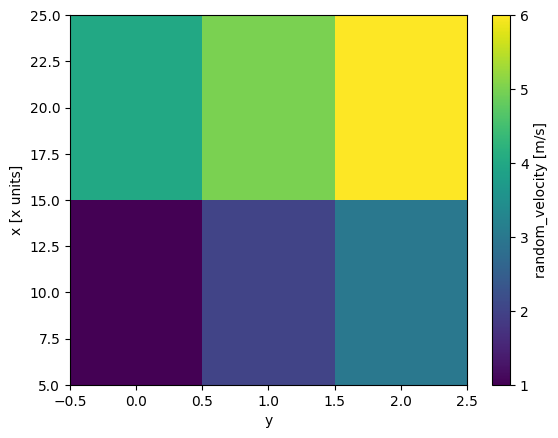
Pandas interaction
# From xarray to multi-index pd.Series.
srs = data.to_series()
srs
x y
10 0 1
1 2
2 3
20 0 4
1 5
2 6
dtype: int64# From pd.Series to xarray.
srs.to_xarray()Loading...
df = data.to_dataframe(name="hello")
df
Loading...
Datasets
xarray.Datasetis a dict-like container of alignedxarray.DataArray- It is like a generalization of a
pd.DataFrame
- It is like a generalization of a
- Variables in a
Datasetcan have different dimensions and dtypes - If two variables have the same dimension (e.g.,
x) the dimension must be identical in both variables
Build from dictionary
# Create a dictionary with heterogeneous data.
dict_ = dict(foo=data, bar=("x", [1, 2]), baz=np.pi)
print(dict_)
{'foo': <xarray.DataArray (x: 2, y: 3)> Size: 48B
array([[1, 2, 3],
[4, 5, 6]])
Coordinates:
* x (x) int64 16B 10 20
Dimensions without coordinates: y
Attributes:
long_name: random_velocity
units: m/s
description: A random var created as an example, 'bar': ('x', [1, 2]), 'baz': 3.141592653589793}
# Create a `xarray.Dataset` from the dictionary.
# - `foo` is a DataArray (with 2 dimensions `x` and `y`)
# - `bar` is a one-dimensional array with dimension `x`
# - `baz` is a scalar (with no dimensions)
ds = xr.Dataset(dict_)
ds
Loading...
Extract one variable
# Extract one variable from the dataset.
ds["foo"]
# This is equivalent to
# ds.foo
assert str(ds.foo) == str(ds["foo"])ds["bar"]Loading...
ds["baz"]Loading...
Extract multiple vars
ds[["foo", "bar"]].to_dataframe().valuesarray([[1, 1],
[2, 1],
[3, 1],
[4, 2],
[5, 2],
[6, 2]])Slicing
# Both `foo` and `bar` variables have the same coordinate `x`, so we can use `x` to slice the data.
ds["x"]
# ds.bar["x"]
# ds.foo["x"]
Loading...
Computation
Most of the computations for DataArray are possible also on Dataset
xarrayAPI is inspired by Pandas- Pandas dataframe is focused on low-dimensional tabular data, where there is a rows-and-columns structure
- Pandas N-dimensional panels were deprecated in favor of
xarray.DataArray
- Pandas N-dimensional panels were deprecated in favor of
xarrayallows ndim > 2 dimensional array for which the order of dimensions doesn’t really matter- E.g., a movie is represented as a 4-dim array with time, row, column, color
DataArray- A multidimensional array with labeled dimensions
- It contains metadata, such as dimension, names, coordinates, and attributes to the data
Dataset- A dict-like collection of
DataArrayobjects with aligned dimensions
- A dict-like collection of
Dimension
- The dimension of data is related to the number of degrees of freedom of it
Dimension axis
- Set of all points in which all but one of the degrees of freedom is fixed
- Each dimension axis has a name (e.g., “x dimension”)
- The dimensions are stored in
da.dims
Coordinate
- An array that labels a dimension (like tick labels along a dimension)
- A dimension can have a coordinate or not
- A dimension can have an index (to use selection and alignment) or not