numpy ndarray
Table of Contents
numpy (numerical python)
high performance scientific computing and data analysis
ndarray= fast space-efficient multidim array with- vectorized arithmetic operations (no loops)
- sophisticated broadcasting capabilities
sorting, unique, set operation
data alignment
reading / writing arrays to disk and memory-mapped files
linear algebra
random number generation
FFT, ...
tools for integrating code with C, C++, Fortran
- easy C API to call external libraries
import numpy as npnumpy ndarray
- ndarray = N-Dim array object
Creating arrays
# From sequence-like object to ndarray.
data1 = [6, 7.5, 8, 0, 1]

arr1 = np.array(data1)

print("arr1=", arr1)
# It's like a vector not a matrix.
print("arr1.shape=", arr1.shape)
print("arr1.dtype=", arr1.dtype)
arr1= [6. 7.5 8. 0. 1. ]
arr1.shape= (5,)
arr1.dtype= float64
data2 = [[1, 2, 3, 4], [5, 6, 7, 8]]
arr2 = np.array(data2)

print("arr2=\n", arr2)
print("arr2.shape=", arr2.shape)
# np.array() tries to infer the right type, if not done explicitly.
print("arr2.dtype=", arr2.dtype)
arr2=
[[1 2 3 4]
[5 6 7 8]]
arr2.shape= (2, 4)
arr2.dtype= int64
np.zeros(10)array([0., 0., 0., 0., 0., 0., 0., 0., 0., 0.])np.zeros((3, 6))array([[0., 0., 0., 0., 0., 0.],
[0., 0., 0., 0., 0., 0.],
[0., 0., 0., 0., 0., 0.]])np.zeros_like(arr2)array([[0, 0, 0, 0],
[0, 0, 0, 0]])# Returns unitialized garbage values.
np.empty((2, 3, 2))array([[[440.49722222, 33.72222222],
[449.73722222, 33.72222222],
[458.97722222, 33.72222222]],
[[458.97722222, 403.32222222],
[449.73722222, 403.32222222],
[440.49722222, 403.32222222]]])np.arange(15)array([ 0, 1, 2, 3, 4, 5, 6, 7, 8, 9, 10, 11, 12, 13, 14])np.eye(5)array([[1., 0., 0., 0., 0.],
[0., 1., 0., 0., 0.],
[0., 0., 1., 0., 0.],
[0., 0., 0., 1., 0.],
[0., 0., 0., 0., 1.]])Data types
- map directly onto machine representation
int*, uint*float*complex*boolobject(python object)string*(fixed length string)unicode*(fixed length unicode, num of bytes depending on machine)
- easy to read / write to disk
- easy to interface with low-level code in C and Fortran
arr1 = np.array([1, 2, 3], dtype=np.float64)
print(arr1)
[1. 2. 3.]
arr2 = np.array([-1, 2, 3], dtype=np.int32)
print(arr2)
[-1 2 3]
arr2 = np.array([-1, 2, 3], dtype=np.uint32)
print(arr2)
[4294967295 2 3]
# Cast an array from one type to another.
# It always create a new array even if dtype is not changed.
arr = np.array([1, 2, 3, 4, 5])
print(arr)
print(arr.dtype)

float_arr = arr.astype(np.float64)
print(float_arr)
print(float_arr.dtype)
[1 2 3 4 5]
int64
[1. 2. 3. 4. 5.]
float64
str_arr = np.array(["1.25", "-9.6", "42"], dtype=np.string_)
print(str_arr)
print(str_arr.dtype)

print(str_arr.astype(float))
[b'1.25' b'-9.6' b'42']
|S4
[ 1.25 -9.6 42. ]
Operations between Arrays and Scalar
- One can express operations on data without for loops
arr = np.array([[1.0, 2.0, 3.0], [4.0, 5.0, 6.0]])

print(arr + arr)
# Broadcast.
print(1 / arr)
print(arr * arr)
print(arr**0.5)
[[ 2. 4. 6.]
[ 8. 10. 12.]]
[[1. 0.5 0.33333333]
[0.25 0.2 0.16666667]]
[[ 1. 4. 9.]
[16. 25. 36.]]
[[1. 1.41421356 1.73205081]
[2. 2.23606798 2.44948974]]
Basic index and slicing
arr = np.arange(10)

print(arr)

print(arr[5])
print(arr[5:8])
[0 1 2 3 4 5 6 7 8 9]
5
[5 6 7]
# Broadcasting write.
arr[5:8] = 12
print(arr)
[ 0 1 2 3 4 12 12 12 8 9]
# Slices are "views" on the original array. No data is copied.

arr_slice = arr[5:8]
print(arr_slice)

arr_slice[1] = 12345
print(arr_slice)

arr_slice[:] = 64
print(arr_slice)

print(arr)
[12 12 12]
[ 12 12345 12]
[64 64 64]
[ 0 1 2 3 4 64 64 64 8 9]
arr2d = np.array([[1, 2, 3], [4, 5, 6], [7, 8, 9]])
print(arr2d)
[[1 2 3]
[4 5 6]
[7 8 9]]
print(arr2d[2])[7 8 9]
print(arr2d[2][0])7
arr3d = np.array([[[1, 2, 3], [4, 5, 6]], [[7, 8, 9], [10, 11, 12]]])
print(arr3d)
print(arr3d.shape)
[[[ 1 2 3]
[ 4 5 6]]
[[ 7 8 9]
[10 11 12]]]
(2, 2, 3)
# Fixing the first index, returns a 2x3 array.
print(arr3d[0])
[[1 2 3]
[4 5 6]]
arr3d[0] = 42

print(arr3d)
[[[42 42 42]
[42 42 42]]
[[ 7 8 9]
[10 11 12]]]
# Return all the values whose indices start with (1, 0), i.e.,
# a 1-d array.
print(arr3d[1][0])
print(arr3d[1, 0])
[7 8 9]
[7 8 9]
Indexing with slices.
arr2darray([[1, 2, 3],
[4, 5, 6],
[7, 8, 9]])# Slice first index, i.e., columns.
print(arr2d[:2])
print(arr2d[:2].shape)[[1 2 3]
[4 5 6]]
(2, 3)
arr2d[:2, 1:]array([[2, 3],
[5, 6]])arr2d[1, :2]array([4, 5])arr2d[2, :1]array([7])# A colon : means "the entire axis"
arr2d[:, :1]array([[1],
[4],
[7]])Boolean indexing
names = np.array(["Bob", "Joe", "Will", "Bob", "Will", "Joe", "Joe"])

print(str(names))
print(repr(names))
['Bob' 'Joe' 'Will' 'Bob' 'Will' 'Joe' 'Joe']
array(['Bob', 'Joe', 'Will', 'Bob', 'Will', 'Joe', 'Joe'], dtype='<U4')
np.random.seed(42)
# Normal data.
data = np.random.randn(7, 4)
print(data)
[[ 0.49671415 -0.1382643 0.64768854 1.52302986]
[-0.23415337 -0.23413696 1.57921282 0.76743473]
[-0.46947439 0.54256004 -0.46341769 -0.46572975]
[ 0.24196227 -1.91328024 -1.72491783 -0.56228753]
[-1.01283112 0.31424733 -0.90802408 -1.4123037 ]
[ 1.46564877 -0.2257763 0.0675282 -1.42474819]
[-0.54438272 0.11092259 -1.15099358 0.37569802]]
print(names)
names == "Bob"
['Bob' 'Joe' 'Will' 'Bob' 'Will' 'Joe' 'Joe']
array([ True, False, False, True, False, False, False])data[names == "Bob"]array([[ 0.49671415, -0.1382643 , 0.64768854, 1.52302986],
[ 0.24196227, -1.91328024, -1.72491783, -0.56228753]])data[names == "Bob", 2:]array([[ 0.64768854, 1.52302986],
[-1.72491783, -0.56228753]])names != "Bob"array([False, True, True, False, True, True, True])print(~(names == "Bob"))
data[~(names == "Bob")][False True True False True True True]
array([[-0.23415337, -0.23413696,  1.57921282,  0.76743473],
       [-0.46947439,  0.54256004, -0.46341769, -0.46572975],
       [-1.01283112,  0.31424733, -0.90802408, -1.4123037 ],
       [ 1.46564877, -0.2257763 ,  0.0675282 , -1.42474819],
[-0.54438272, 0.11092259, -1.15099358, 0.37569802]])dataarray([[ 0.49671415, -0.1382643 , 0.64768854, 1.52302986],
[-0.23415337, -0.23413696, 1.57921282, 0.76743473],
[-0.46947439, 0.54256004, -0.46341769, -0.46572975],
[ 0.24196227, -1.91328024, -1.72491783, -0.56228753],
[-1.01283112, 0.31424733, -0.90802408, -1.4123037 ],
[ 1.46564877, -0.2257763 , 0.0675282 , -1.42474819],
[-0.54438272, 0.11092259, -1.15099358, 0.37569802]])data[data < 0] = 0
dataarray([[0.49671415, 0. , 0.64768854, 1.52302986],
[0. , 0. , 1.57921282, 0.76743473],
[0. , 0.54256004, 0. , 0. ],
[0.24196227, 0. , 0. , 0. ],
[0. , 0.31424733, 0. , 0. ],
[1.46564877, 0. , 0.0675282 , 0. ],
[0. , 0.11092259, 0. , 0.37569802]])Fancy indexing
- One can index using integer arrays
arr = np.empty((8, 4))for i in range(8):
arr[i] = i
print(arr)[[0. 0. 0. 0.]
[1. 1. 1. 1.]
[2. 2. 2. 2.]
[3. 3. 3. 3.]
[4. 4. 4. 4.]
[5. 5. 5. 5.]
[6. 6. 6. 6.]
[7. 7. 7. 7.]]
# Select rows using certain indices.
arr[[4, 3, 0, 6]]
array([[4., 4., 4., 4.],
[3., 3., 3., 3.],
[0., 0., 0., 0.],
[6., 6., 6., 6.]])# Negative indices work as expected.
arr[[-3, -5, -7]]array([[5., 5., 5., 5.],
[3., 3., 3., 3.],
[1., 1., 1., 1.]])arr = np.arange(32).reshape((8, 4))
print(str(arr))[[ 0 1 2 3]
[ 4 5 6 7]
[ 8 9 10 11]
[12 13 14 15]
[16 17 18 19]
[20 21 22 23]
[24 25 26 27]
[28 29 30 31]]
# WARNING: It doesn't select 4 rows and 4 columns.
# It gets elements (1, 0), (5, 3), (7, 1), (2, 2).
arr[[1, 5, 7, 2], [0, 3, 1, 2]]
array([ 4, 23, 29, 10])# To select 4 rows and 4 columns.
arr[[1, 5, 7, 2]][:, [0, 3, 1, 2]]array([[ 4, 7, 5, 6],
[20, 23, 21, 22],
[28, 31, 29, 30],
[ 8, 11, 9, 10]])help(np.ix_)Help on function ix_ in module numpy:
ix_(*args)
Construct an open mesh from multiple sequences.
This function takes N 1-D sequences and returns N outputs with N
dimensions each, such that the shape is 1 in all but one dimension
and the dimension with the non-unit shape value cycles through all
N dimensions.
Using `ix_` one can quickly construct index arrays that will index
the cross product. ``a[np.ix_([1,3],[2,5])]`` returns the array
``[[a[1,2] a[1,5]], [a[3,2] a[3,5]]]``.
Parameters
----------
args : 1-D sequences
Each sequence should be of integer or boolean type.
Boolean sequences will be interpreted as boolean masks for the
corresponding dimension (equivalent to passing in
``np.nonzero(boolean_sequence)``).
Returns
-------
out : tuple of ndarrays
N arrays with N dimensions each, with N the number of input
sequences. Together these arrays form an open mesh.
See Also
--------
ogrid, mgrid, meshgrid
Examples
--------
>>> a = np.arange(10).reshape(2, 5)
>>> a
array([[0, 1, 2, 3, 4],
[5, 6, 7, 8, 9]])
>>> ixgrid = np.ix_([0, 1], [2, 4])
>>> ixgrid
(array([[0],
[1]]), array([[2, 4]]))
>>> ixgrid[0].shape, ixgrid[1].shape
((2, 1), (1, 2))
>>> a[ixgrid]
array([[2, 4],
[7, 9]])
>>> ixgrid = np.ix_([True, True], [2, 4])
>>> a[ixgrid]
array([[2, 4],
[7, 9]])
>>> ixgrid = np.ix_([True, True], [False, False, True, False, True])
>>> a[ixgrid]
array([[2, 4],
[7, 9]])
# np.ix_() converts indices.
idxs = np.ix_([1, 5, 7, 2], [0, 3, 1, 2])
print(idxs)

print(arr[idxs])
(array([[1],
[5],
[7],
[2]]), array([[0, 3, 1, 2]]))
[[ 4 7 5 6]
[20 23 21 22]
[28 31 29 30]
[ 8 11 9 10]]
Transposing arrays and swapping axes.
arr = np.arange(15).reshape((3, 5))
print(arr)
[[ 0 1 2 3 4]
[ 5 6 7 8 9]
[10 11 12 13 14]]
print(arr.T)[[ 0 5 10]
[ 1 6 11]
[ 2 7 12]
[ 3 8 13]
[ 4 9 14]]
np.dot(arr.T, arr)array([[125, 140, 155, 170, 185],
[140, 158, 176, 194, 212],
[155, 176, 197, 218, 239],
[170, 194, 218, 242, 266],
[185, 212, 239, 266, 293]])arr = np.arange(16).reshape((2, 2, 4))
print(arr)[[[ 0 1 2 3]
[ 4 5 6 7]]
[[ 8 9 10 11]
[12 13 14 15]]]
Universal functions
- ufunc performs elementwise operations on data in ndarrays
arr = np.arange(10)

print(np.sqrt(arr))
print(np.exp(arr))
[0. 1. 1.41421356 1.73205081 2. 2.23606798
2.44948974 2.64575131 2.82842712 3. ]
[1.00000000e+00 2.71828183e+00 7.38905610e+00 2.00855369e+01
5.45981500e+01 1.48413159e+02 4.03428793e+02 1.09663316e+03
2.98095799e+03 8.10308393e+03]
np.random.seed(42)
x = np.random.randn(8)
y = np.random.randn(8)

print(x)
print(y)

print(np.maximum(x, y))
[ 0.49671415 -0.1382643 0.64768854 1.52302986 -0.23415337 -0.23413696
1.57921282 0.76743473]
[-0.46947439 0.54256004 -0.46341769 -0.46572975 0.24196227 -1.91328024
-1.72491783 -0.56228753]
[ 0.49671415 0.54256004 0.64768854 1.52302986 0.24196227 -0.23413696
1.57921282 0.76743473]
np.add(x, y)array([ 0.02723977, 0.40429574, 0.18427085, 1.0573001 , 0.0078089 ,
-2.1474172 , -0.14570502, 0.2051472 ])np.greater(x, y)array([ True, False, True, True, False, True, True, True])np.not_equal(x, y)array([ True, True, True, True, True, True, True, True])np.logical_xor(np.not_equal(x, y), np.greater(x, y))array([False, True, False, False, True, False, False, False])Data processing using arrays
# Evaluate

# - Pick 1000 equi-spaced points between [-5, 5].
points = np.arange(-5, 5, 0.01)
print("points=", points[:5])

# - Create a grid of points.
xs, ys = np.meshgrid(points, points)
print("xs=\n", xs)
print("ys=\n", ys)

# - Evaluate function on a grid.
z = np.sqrt(xs**2 + ys**2)
points= [-5. -4.99 -4.98 -4.97 -4.96]
xs=
[[-5. -4.99 -4.98 ... 4.97 4.98 4.99]
[-5. -4.99 -4.98 ... 4.97 4.98 4.99]
[-5. -4.99 -4.98 ... 4.97 4.98 4.99]
...
[-5. -4.99 -4.98 ... 4.97 4.98 4.99]
[-5. -4.99 -4.98 ... 4.97 4.98 4.99]
[-5. -4.99 -4.98 ... 4.97 4.98 4.99]]
ys=
[[-5. -5. -5. ... -5. -5. -5. ]
[-4.99 -4.99 -4.99 ... -4.99 -4.99 -4.99]
[-4.98 -4.98 -4.98 ... -4.98 -4.98 -4.98]
...
[ 4.97 4.97 4.97 ... 4.97 4.97 4.97]
[ 4.98 4.98 4.98 ... 4.98 4.98 4.98]
[ 4.99 4.99 4.99 ... 4.99 4.99 4.99]]
import matplotlib.pyplot as plt

plt.imshow(z, cmap=plt.cm.gray)
plt.colorbar()
plt.title("hello")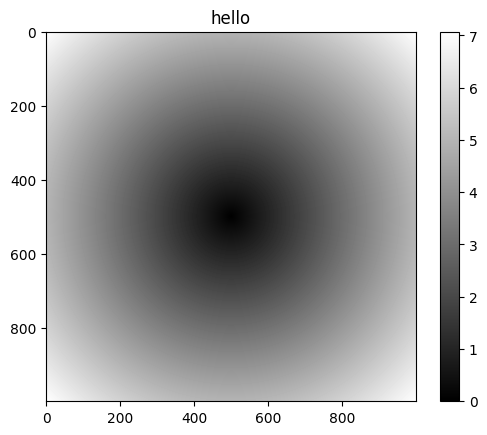
Expressing conditional logic as array operations.
numpy.whereis vectorized form ofif-then-else
xarr = np.array([1.1, 1.2, 1.3, 1.4, 1.5])
yarr = np.array([2.1, 2.2, 2.3, 2.4, 2.5])
cond = np.array([True, False, True, True, False])

result = [(x if c else y) for x, y, c in zip(xarr, yarr, cond)]
print([round(x, 3) for x in result])

# This is an array.
print(np.where(cond, xarr, yarr))
[1.1, 2.2, 1.3, 1.4, 2.5]
[1.1 2.2 1.3 1.4 2.5]
np.random.seed(42)
arr = np.random.randn(4, 4)

print(arr)
[[ 0.49671415 -0.1382643 0.64768854 1.52302986]
[-0.23415337 -0.23413696 1.57921282 0.76743473]
[-0.46947439 0.54256004 -0.46341769 -0.46572975]
[ 0.24196227 -1.91328024 -1.72491783 -0.56228753]]
np.where(arr > 0, 2, -2)array([[ 2, -2, 2, 2],
[-2, -2, 2, 2],
[-2, 2, -2, -2],
[ 2, -2, -2, -2]])# Note that the operation is vectorized, thus one array is let pass.
np.where(arr > 0, 2, arr)array([[ 2. , -0.1382643 , 2. , 2. ],
[-0.23415337, -0.23413696, 2. , 2. ],
[-0.46947439, 2. , -0.46341769, -0.46572975],
[ 2. , -1.91328024, -1.72491783, -0.56228753]])Mathematical and statistical methods
np.random.seed(42)
arr = np.random.randn(5, 4)

# One can call the method on the array or the np function.
print(arr.mean())
print(np.mean(arr))
-0.17129856144182892
-0.17129856144182892
arr.mean(axis=1)array([ 0.63229206, 0.4695893 , -0.21401545, -0.98963083, -0.75472789])arr = np.array([[0, 1, 2], [3, 4, 5], [6, 7, 8]])
print(arr)
# Cumsum on different axis.
print(arr.cumsum(axis=0))
print(arr.cumsum(axis=1))[[0 1 2]
[3 4 5]
[6 7 8]]
[[ 0 1 2]
[ 3 5 7]
[ 9 12 15]]
[[ 0 1 3]
[ 3 7 12]
[ 6 13 21]]
arr = np.random.randn(100)

# Sum all positive numbers.
(arr > 0).sum()47bools = np.array([False, False, True, False])
print(bools.any())
print(bools.all())True
False
## Sorting.np.random.seed(8)
arr = np.random.randn(8)
print(arr)
arr.sort()
print(arr)[ 0.09120472 1.09128273 -1.94697031 -1.38634953 -2.29649157 2.4098343
1.72783617 2.20455628]
[-2.29649157 -1.94697031 -1.38634953 0.09120472 1.09128273 1.72783617
2.20455628 2.4098343 ]
arr = np.random.randn(5, 3)
print(arr)
[[ 0.79482764 0.9764211 -1.18342715]
[ 1.91636361 -1.1233268 -0.66403547]
[-0.37835857 -0.79161527 0.85954811]
[-0.230789 -0.06566103 -0.20863623]
[ 1.34686857 -0.6069528 -0.17424821]]
arr.sort(axis=1)
print(arr)
[[-1.18342715 0.79482764 0.9764211 ]
[-1.1233268 -0.66403547 1.91636361]
[-0.79161527 -0.37835857 0.85954811]
[-0.230789 -0.20863623 -0.06566103]
[-0.6069528 -0.17424821 1.34686857]]
Unique and set logic
names = np.array(["Bob", "Joe", "Will", "Bob", "Will", "Joe", "Joe"])

print(np.unique(names))
['Bob' 'Joe' 'Will']
values1 = np.array([6, 0, 0, 3, 2, 5, 6])
print(values1)

# Check memership of values in values1 wrt a given set.
print(np.in1d(values1, [2, 3, 6]))
[6 0 0 3 2 5 6]
[ True False False True True False True]
values2 = np.array([6, 1, 7, 3, 2, 5, 6])
print("values1=", values1)
print("values2=", values2)

print("intersect=", np.intersect1d(values1, values2))
print("union=", np.union1d(values1, values2))
# A - B
print("diff=", np.setdiff1d(values1, values2))
# Symmetric difference: elements that in either of arrays, but not both.
print("xor=", np.setxor1d(values1, values2))
values1= [6 0 0 3 2 5 6]
values2= [6 1 7 3 2 5 6]
intersect= [2 3 5 6]
union= [0 1 2 3 5 6 7]
diff= [0]
xor= [0 1 7]
File input and output
Storing arrays on disk in binary form.
arr = np.arange(10)
print(arr)
np.save("some_array.npy", arr)
[0 1 2 3 4 5 6 7 8 9]
arr2 = np.load("some_array.npy")
print(arr2)
[0 1 2 3 4 5 6 7 8 9]
np.savez("some_array_lazy.npz", arr2)Linear algebra
x = np.array([[1.0, 2.0, 3.0], [4.0, 5.0, 6.0]])
print("x=\n", x)
y = np.array([[6.0, 23.0], [-1, 7], [8, 9]])
print("y=\n", y)
x=
[[1. 2. 3.]
[4. 5. 6.]]
y=
[[ 6. 23.]
[-1. 7.]
[ 8. 9.]]
print(x.dot(y))
print(np.dot(x, y))
[[ 28. 64.]
[ 67. 181.]]
[[ 28. 64.]
[ 67. 181.]]
from numpy.linalg import inv, qr

np.random.seed(42)

X = np.random.randn(5, 5)
mat = X.T.dot(X)
print("mat=\n", mat)
mat=
[[ 2.9805946 0.01599104 -0.04782309 0.17546989 0.55226368]
[ 0.01599104 3.80673615 0.67617578 1.18044033 3.24587224]
[-0.04782309 0.67617578 1.17031369 -0.21833843 -0.63321793]
[ 0.17546989 1.18044033 -0.21833843 9.05508255 4.74692465]
[ 0.55226368 3.24587224 -0.63321793 4.74692465 5.61549503]]
# Inverse.
inv(mat)
array([[ 0.46603249, 0.83005941, -0.8914962 , 0.34032244, -0.91383502],
[ 0.83005941, 5.63797815, -5.98435482, 2.17215259, -5.85149016],
[-0.8914962 , -5.98435482, 7.27912183, -2.36447819, 6.3663243 ],
[ 0.34032244, 2.17215259, -2.36447819, 1.04007417, -2.43484522],
[-0.91383502, -5.85149016, 6.3663243 , -2.43484522, 6.42635506]])q, r = qr(mat)
print("q=\n", q)
print("r=\n", r)q=
[[-0.98148564 0.12744066 -0.11323416 0.02870785 -0.08245418]
[-0.00526572 -0.74003655 -0.34273964 0.23683889 -0.52797259]
[ 0.01574776 -0.13366892 -0.7682216 -0.24850681 0.57442543]
[-0.05778081 -0.22201126 0.17465578 -0.93198858 -0.21969302]
[-0.18185595 -0.60741123 0.49903758 0.11280449 0.57984193]]
r=
[[-3.03681936 -0.68357993 0.18957716 -1.56834194 -1.86459486]
[ 0. -5.13911996 -0.2298267 -5.71568758 -6.71182716]
[ 0. 0. -1.4795309 3.69369571 2.94284836]
[ 0. 0. 0. -7.56488899 -2.84866447]
[ 0. 0. 0. 0. 0.09022874]]
print(np.diag(mat))[2.9805946 3.80673615 1.17031369 9.05508255 5.61549503]
print(np.trace(mat))22.628222027495298
# print(np.eig(mat))# print(np.svd(mat))